Protect Members renames object member names across the files in a project. It is the cross-file counterpart to simpler member-hiding options such as Move Members.
What it protects
This feature targets member names such as value in myobj.value or Start in helper.Start(). Unlike Move Members, which only hides access syntax, Protect Members actually changes the member names themselves.
Because member names often form part of a public API, this mode is stricter than Replace Globals. You should explicitly decide which members are safe to rename.
Recommended workflow
- Mark private members with a naming rule, such as a double-underscore prefix.
- Configure Rename by rules or Custom Identities so only those private members are eligible.
- Keep every related file in the same JavaScript Obfuscator project so the renamed members stay consistent everywhere.
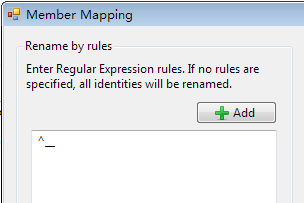
Example across files
Using a rule such as ^__, the member names that start with a double underscore can be renamed everywhere they appear in the project.
Configuration
{
  "options": {
    "RenameMembers": true
  }
}
From the open-source javascript-obfuscator package, renameProperties maps to RenameMembers. Its renamePropertiesMode is accepted for migration review — see npm migration.
Why this option needs more care than the others
Every other transform on this site is contained: it changes a file and the file still presents the same interface to the world. This one changes an interface. A renamed property is a different property, and anything that reads it by its original name stops working — usually at runtime, on one code path, with no build error.
The places a member name escapes your JavaScript are easy to overlook:
- JSON boundaries. A field name in a request body or a response your code reads is a contract with a server.
JSON.parse produces the server's names, not your renamed ones.
- Storage. Anything already written to
localStorage, IndexedDB, or a cookie by a previous release carries the old names. Renaming makes existing user data unreadable.
- Templates and markup. A framework binding such as
{{item.total}} is text in a template, and a data- attribute read by name is text in your HTML.
- Framework conventions. Lifecycle hooks, component prop names, and anything a library resolves by string.
- Reflection.
Object.keys, for...in, and destructuring by name all see the new names.
This is why the recommended workflow inverts the default: rather than renaming everything and excluding what breaks, mark what is private with a naming convention and rename only that. Opting in is recoverable; opting out means discovering each contract by breaking it.
Built-in members are never renamed
One contract you do not have to discover for yourself: the platform’s own. A member such as at, map, then, length or addEventListener belongs to JavaScript, the standard library or the browser — the object it is called on is not yours, so renaming your side of the call could never make the other side agree. A broad pattern like .* used to rename those too, and the build died at the first [0,1,2].at(-1) with “at is not a function”.
The engine now declines that part of the instruction. A curated allowlist of language, standard-library, DOM and Node member names is excluded from the pattern path, so the platform’s own members are left alone.
This is a safety net, not a licence to match everything. Write a pattern that describes your own naming convention — an explicit list, a prefix, a suffix — rather than an open-ended one such as .* or .+. A pattern scoped to names you actually own is the supported way to use this option, and it is what the recommended workflow above is for.
- An explicit mapping still wins. Naming a member in the custom mapping (for example
at:zz9) is an unambiguous statement that you own an at of your own, so it is honoured. Only the regexp path consults the allowlist.
- It does not weaken renaming. Your own members still rename under the same pattern; only platform names are skipped.
- To restore the old behaviour, set
RenameBuiltinMembers to True. That renames platform members again, with the consequences above — it exists for completeness, not as a recommendation.
A member of yours that happens to share a built-in’s name simply keeps its name. That is a smaller loss than a build that does not run.
Related options
- Move Members hides member access without renaming anything, so it carries none of the risk above. Start there if you are unsure.
- Replace Globals renames global identifiers — the same class of cross-file decision, one scope up.
- Protect Object Declaration hides object structure without changing key names.
- Variable Exclusion List covers identifiers rather than members; the two lists are separate.
- Because renaming is project-wide, keep every related file in one project and one build. A file protected in a separate run gets its own naming decisions and will not agree with the rest — see release workflows, and code splitting for what that looks like with lazy chunks.
- Custom elements are the sharpest case for this option, because the browser calls your lifecycle methods and reads your options-object keys by name without ever appearing as a caller — obfuscating web components lists every name to reserve.
- Message keys — a postMessage payload is serialised data keyed by member names, so the same exclusion rules apply.
- The six ways renaming fails — across several hundred measured case studies on this site the failure is almost never an exception. It is a default quietly taking over, a downstream reader skipping a name it does not recognise, or a write landing beside the real field, and each of those leaves a run that reports success. Read it before choosing a rule.
- Security controls are the sharpest category for this option, because a library that cannot read your policy uses its own weaker default and reports a normal run.
Best practice: only rename members that are truly private to your own code. If third-party scripts, templates, or external callers depend on a member name, leave it out of the protection rules. When protected output throws an undefined-property error, this is the first option to suspect —
the six causes of broken protected output walks the diagnosis in order.
Frequently asked questions
When should this option stay off?
Whenever anything outside your own code refers to a property by name. Templates, framework bindings, serialised data whose keys match your object shape, external callers, and test assertions all break in the same silent way: the object still exists, the property no longer does, and there is no build error to tell you. If you cannot enumerate what refers to your members, start with the option off and add rules once you can.
What is the recommended way to introduce it?
Narrowly and in one direction. Pick the members that are genuinely private to your own code, protect those, and leave everything reachable from outside alone. That is easier when your objects have a small deliberate public surface, so the work of introducing this option is often the work of tidying that surface first. Run your real test suite against the protected output rather than checking that the file loads.
How is this different from name mangling?
Name mangling renames identifiers such as variables, parameters and function names, which are resolved by the JavaScript engine within a scope it can see. Member protection renames property names, which are resolved by string lookup at run time and can therefore be referenced from places the engine cannot see: markup, data files, other bundles, a framework's own conventions. That difference in resolution is the whole reason this option needs more care than the others.
Does renaming members help against automated analysis?
It removes one of the more useful signals a reader has. Property names frequently describe intent more precisely than variable names do, because they survive minification in ordinary builds and are chosen to be meaningful to whoever consumes the object. Removing them raises the cost of reconstructing what a structure represents. As with every transform on this site, that is a cost increase rather than concealment, and it works best combined with the string transforms.
What does the failure look like in production?
An undefined property error, or more often no error at all and a feature that quietly does nothing. When protected output misbehaves and this option is enabled, suspect it first: check whether the failing path reaches a property through a name that also appears in a template, a configuration file or a network response. The diagnosis guide walks the six usual causes in order, and this is consistently the first one worth eliminating.
Can we keep the same member names across two separate builds?
Only through explicit rules, not by expecting generated names to match. Generated names are produced per build, so two projects protected independently will not agree on them. If two builds have to interoperate on a property name, either exclude that name from protection or pin it explicitly, exactly as you would for any other value that crosses a build boundary.