Flat Transform is one of the strongest structure-level protections in JavaScript Obfuscator. It breaks logic apart and reorders it so the execution flow is much harder to follow by inspection. Where name mangling changes what things are called, this changes the shape of the program itself.
What it changes
This mode splits statements as aggressively as possible and moves them into a less readable arrangement, dispatched through generated state rather than laid out in order. It also works well with nested-function movement, which means the final file no longer preserves the comfortable visual order of the original source.
The consequence for a reader is that source position stops predicting execution order. In ordinary code, reading top to bottom approximates what happens at runtime, and the nesting of if and loop bodies shows you the branch structure directly. After flattening, the statements are fragments selected by a dispatcher, and reconstructing "what runs after what" means tracing state transitions rather than reading indentation.
This is the same building block VM bytecode interpreters are made of — a dispatch loop over opaque state. VM protection takes it further by moving selected functions out of JavaScript form entirely.
When to use it
- When you want a stronger result than basic name replacement alone.
- When you are willing to test output carefully for compatibility and performance.
- When protecting production code matters more than keeping the transformed file compact or easy to troubleshoot.
The inverse is just as useful to state. Do not reach for this on code whose value is low, on hot paths where the dispatch overhead will show up in a frame budget, or in a project where you cannot run a real test suite against protected output.
Configuration
Flat Transform sits inside the wrapper that Code Transposition creates, so enable both:
{
  "options": {
    "ReorderCode": true,
    "FlatTransform": true
  }
}
Migrating from the open-source javascript-obfuscator package? Its single controlFlowFlattening flag maps to FlatTransform together with DeepObfuscate — one upstream option, two here. See npm migration for the complete table.
Visual reference
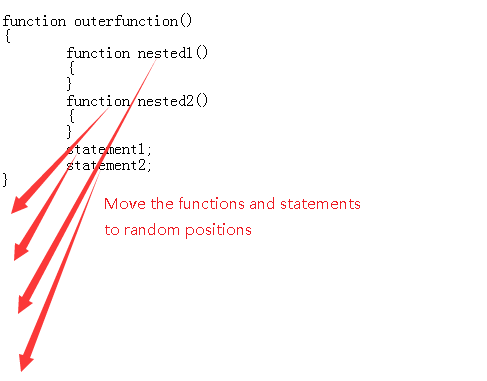
Cost, and how to scope it
Flattening is the most expensive transform in the set on both axes. Output grows, because dispatch scaffolding is added around fragments that used to be plain statements. Runtime cost rises, because control flow that was a direct jump becomes a dispatch step.
That makes scoping the difference between a usable build and an unusable one:
- Apply it to what deserves it. Named configuration sets let you flatten
src/licensing/** or src/pricing/** and leave marketing pages and vendor code on a lighter preset.
- Narrow further with inline directives when only one function in a file is the asset.
- Keep it off hot loops. Render paths, per-frame game updates, and large-list virtualisation are where dispatch overhead becomes visible. The measured picture per transform family is in does obfuscation slow down JavaScript.
- Measure, do not estimate. Profile the protected build on the paths your users actually exercise.
Rolling it out without a long debugging session
Because this transform restructures control flow, it depends on the engine getting several subtle JavaScript rules exactly right — var hoisting out of blocks, a function declared inside a loop body escaping to its enclosing scope, a class body counting as a nested scope, and carrying a return value out of a restructured loop. Each of those has been a real defect class in control-flow flattening implementations generally, including ours.
So sequence the rollout rather than flipping everything at once:
- Validate your project with the lighter options first — name mangling, then string handling — and get a green test run at each step.
- Enable
ReorderCode and FlatTransform as one change, on one scoped part of the tree.
- Build with Code Formatter on so you can read the output when something misbehaves.
- Run compatibility validation, then your full suite. A flattening bug usually produces a wrong value, not a crash, which is exactly why a smoke test is not enough — see verifying an obfuscator did not break your code.
- Keep the identifier map for symbolication; flattened stack traces are unreadable without it.
Recommendation: Flat Transform is powerful, but it should be enabled only after you have already validated your project with the lighter obfuscation options.
Frequently asked questions
What does this change that name mangling does not?
The shape of the program rather than the labels on it. Name mangling changes what things are called; this splits statements apart and dispatches them through generated state instead of leaving them in written order. The consequence for a reader is that source position stops predicting execution order. In ordinary code, reading top to bottom approximates what happens at run time and the nesting shows you the branch structure. After flattening, statements are fragments selected by a dispatcher, so working out what runs after what means tracing state transitions rather than reading indentation.
Do we need to enable anything alongside it?
Yes, one thing. This transform operates inside the wrapper that code transposition creates, so both options have to be on for it to take effect. It also pairs naturally with nested-function movement and with the identifier-level counterpart, which are usually enabled together with it rather than separately.
How does this map from the open-source package's flattening option?
One upstream option becomes two here. The single control-flow flattening flag in the open-source package corresponds to this transform together with the deep obfuscation option, so a migration that sets only one of them will produce weaker output than the configuration it came from. The complete mapping table is on the migration page, and it is worth working through rather than translating option names by eye.
What does it cost?
More than anything else in the set, on both axes. Output grows because dispatch scaffolding is added around fragments that used to be plain statements. Run time rises because control flow that was a direct jump becomes a dispatch step. Neither is a reason to avoid it, but both are reasons to scope it rather than applying it everywhere, and to profile the protected build on the paths your users actually exercise instead of estimating.
How should we scope it?
By value rather than by convenience. Named configuration sets let you flatten the directories that hold the actual asset, such as licensing or pricing logic, while marketing pages and vendor code stay on a lighter preset. Inline directives narrow it further when only one function in a file is worth the cost. And keep it off hot paths entirely, because render loops, per-frame game updates and large-list virtualisation are exactly where dispatch overhead becomes visible in a frame budget.
What is the safe rollout order?
Sequenced rather than all at once, because restructuring control flow depends on the engine handling several subtle language rules exactly right, and each of those has been a real defect class in flattening implementations generally. Validate the project with the lighter options first and get a green test run at each step. Then enable code transposition and this transform as one change, on one scoped part of the tree. Build with the formatter on so the output is readable when something misbehaves. Run compatibility validation and then your full suite, because a flattening bug usually produces a wrong value rather than a crash, which is why a smoke test is not enough.
How does this relate to the virtual machine protection?
They are the same idea at different depths. A dispatch loop over opaque state is the building block a bytecode interpreter is made from, and this transform produces a static state machine of that kind. The virtual machine option takes it further by moving selected functions out of JavaScript form entirely. Where the static state machine is not enough for a specific function, that is the escalation path rather than turning this option up higher.